

Redraw a picture as TikZ
Upload a picture of a figure and AI redraws it as a sharp figure with its TikZ code, for an exam, Word or LaTeX.
Try it
AI draws it and can be wrong. Compare it with your picture.
AI Học nè: 160 credits a figure · Your own AI works too
Examples
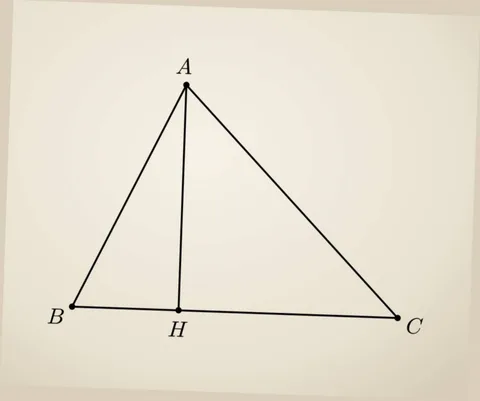
TikZ code
\begin{tikzpicture}[x=0.0030366cm, y=-0.0030366cm, line cap=round, line join=round, lw/.style={line width=#1*0.0864pt}, cap/.style={scale=#1*0.0126501, fill=none, inner sep=1pt}, dash/.style 2 args={dash pattern=on #1*0.0864pt off #2*0.0864pt, line cap=butt}]
\path (0,0) rectangle (1000,835);

\path (388,178) coordinate (A)
      (151,639) coordinate (B)
      (829,663) coordinate (C)
      ($(B)!(A)!(C)$) coordinate (H);

\fill (A) circle (7)
      (B) circle (7)
      (C) circle (7)
      (H) circle (7);

\draw[lw=4.2]
      (A) -- (B) -- (C) -- cycle
      (A) -- (H);

\node[cap=33.3] at (383,138) {$A$};
\node[cap=33.3] at (117,658) {$B$};
\node[cap=33.3] at (865,679) {$C$};
\node[cap=33.3] at (371,685) {$H$};

\end{tikzpicture}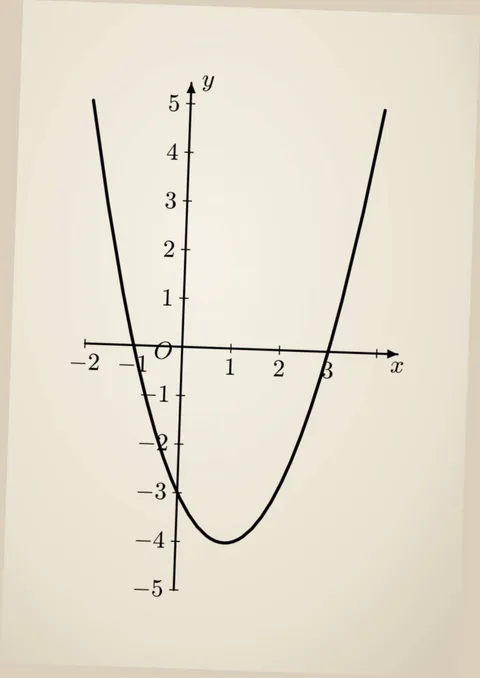
TikZ code
\begin{tikzpicture}[x=0.0042892cm, y=-0.0042892cm, line cap=round, line join=round, lw/.style={line width=#1*0.12204pt}, cap/.style={scale=#1*0.0178682, fill=none, inner sep=1pt}, dash/.style 2 args={dash pattern=on #1*0.12204pt off #2*0.12204pt, line cap=butt}]
\path (0,0) rectangle (708,1000);

\path
  (269,512) coordinate (O)
  (125,507) coordinate (Xstart)
  (586,523) coordinate (Xtip)
  (256,871) coordinate (Ystart)
  (283,123) coordinate (Ytip)
  (138,149) coordinate (Pleft)
  (331,801) coordinate (Pvertex)
  (570,164) coordinate (Pright);

% Hai trục tọa độ.
\draw[lw=2.6,-{Latex[length=2.2pt,width=1.6pt]}]
  (Xstart) -- (Xtip)
  (Ystart) -- (Ytip);

% Các vạch chia trên hai trục.
\draw[lw=1.6]
  (125,501) -- (125,513)
  (341,509) -- (341,521)
  (413,511) -- (413,523)
  (557,516) -- (557,528)
  (275,154) -- (289,154)
  (272,225) -- (286,225)
  (270,297) -- (284,297)
  (267,369) -- (281,369)
  (265,440) -- (279,440)
  (259,584) -- (273,584)
  (257,655) -- (271,655)
  (254,727) -- (268,727)
  (252,799) -- (266,799)
  (249,871) -- (263,871);

% Các dấu trừ.
\draw[lw=2]
  (105,535) -- (122,535)
  (162,540) -- (179,540)
  (220,583) -- (230,583)
  (192,655) -- (209,655)
  (204,727) -- (221,727)
  (201,798) -- (218,798)
  (199,870) -- (216,870);

% Đường parabol.
\draw[lw=4.2]
  (Pleft)
    .. controls (194,581) and (259,799) .. (Pvertex)
    .. controls (403,804) and (482,591) .. (Pright);

% Nhãn trục và gốc tọa độ.
\node[cap=26.55,xscale=0.85] at (308,122) {$y$};
\node[cap=24.3,xscale=0.87] at (586,542) {$x$};
\node[cap=25.1,xscale=0.9] at (241,529) {$O$};

% Nhãn trên trục tung.
\node[cap=16.2,xscale=1.24] at (257,157) {$5$};
\node[cap=25.1,xscale=0.88] at (254,224) {$4$};
\node[cap=25.1,xscale=0.88] at (251,296) {$3$};
\node[cap=25.1,xscale=0.80] at (249,367) {$2$};
\node[cap=25.1,xscale=0.56] at (247,439) {$1$};
\node[cap=25.1,xscale=0.64] at (242,581) {$1$};
\node[cap=25.1,xscale=0.80] at (224,653) {$2$};
\node[cap=25.1,xscale=0.88] at (237,725) {$3$};
\node[cap=25.1,xscale=0.88] at (234,796) {$4$};
\node[cap=25.1,xscale=0.80] at (232,868) {$5$};

% Nhãn trên trục hoành.
\node[cap=25.1,xscale=0.80] at (139,533) {$2$};
\node[cap=25.1,xscale=0.64] at (194,538) {$1$};
\node[cap=25.1,xscale=0.64] at (339,541) {$1$};
\node[cap=25.1,xscale=0.80] at (412,544) {$2$};
\node[cap=25.1,xscale=0.80] at (486,546) {$3$};
\end{tikzpicture}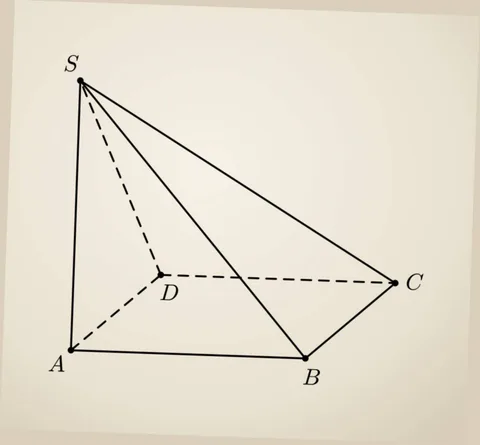
TikZ code
\begin{tikzpicture}[x=0.0030366cm, y=-0.0030366cm, line cap=round, line join=round, lw/.style={line width=#1*0.0864pt}, cap/.style={scale=#1*0.0126501, fill=none, inner sep=1pt}, dash/.style 2 args={dash pattern=on #1*0.0864pt off #2*0.0864pt, line cap=butt}]
\path (0,0) rectangle (1000,927);

\path
  (170,180) coordinate (S)
  (135,815) coordinate (A)
  (310,610) coordinate (D)
  (635,815) coordinate (B)
  (840,625) coordinate (C);

% Dashed lines (hidden edges)
\draw[lw=4.2, dash={12}{8}] (S) -- (D) (D) -- (A) (D) -- (C);

% Solid lines (visible edges)
\draw[lw=4.2] (S) -- (A) (S) -- (B) (S) -- (C) (A) -- (B) (B) -- (C);

% Vertex dots
\foreach \p in {S,A,D,B,C}
  \fill (\p) circle (4);

% Labels
\node[cap=23] at (145, 160) {$S$};
\node[cap=23] at (110, 835) {$A$};
\node[cap=23] at (335, 635) {$D$};
\node[cap=23] at (635, 850) {$B$};
\node[cap=23] at (870, 625) {$C$};

\end{tikzpicture}
Three steps
Drop a picture in
A photo, a crop of a PDF, a hand drawing.
Pick the AI
AI Học nè or your own.
Download or copy the code
PNG, SVG, PDF or a .tex file.
Questions people ask
TikZ draws figures from code inside LaTeX. A TikZ figure prints sharp at any size, and every detail can be changed in the code.
Related tools
Updated November 14, 2026